Controls Dysfunction and Recommissioning
Why We Need to Simulate Dysfunction. The performance of all control systems degrades over time. Most energy-modeling platforms do not include the effects of controls dysfunction, despite its signific…
Why We Need to Simulate Dysfunction
The performance of all control systems degrades over time. Most energy-modeling platforms do not include the effects of controls dysfunction, despite its significant impact on building energy consumption and on a building's ability to support the use of energy-efficient control strategies. The latest version of the AIM software now includes factors to account for controls degradation, as well as energy efficiency measures covering recommissioning and monitoring-based commissioning initiatives. AIM's new and innovative calculation approach allows recommissioning projects to sit alongside more traditional energy-efficiency measures when building the business case for energy efficiency improvements in lab buildings.

How the AIM Calculations Work
Controls dysfunction typically pushes buildings towards higher energy consumption. AIM adds controls dysfunction to its calculations via "ghost" values added to five sets of parameters that are often affected by controls dysfunction:
- Lab airflow
- Space temperatures
- Fume hood airflow
- Energy recovery system performance
- Duct static pressures.
To represent dysfunction, these parameters are adjusted slightly before they are used in the energy calculations. For example, a user-entered room cooling temperature setpoint of 73.0F (22.8C) might be adjusted to 72.8F (22.7C) to represent the dysfunction in the space temperature controls in a moderately well-maintained system. The size of these ghost offsets depends on the level of dysfunction (see below).
Measures that reduce dysfunction reduce the size of the offsets, providing energy savings predictions for the recommissioned building. Some other measures are blocked at high dysfunction levels, reflecting the difficulty of implementing advanced control features within a system that has poor performance.
Adjusting Current Controls Performance
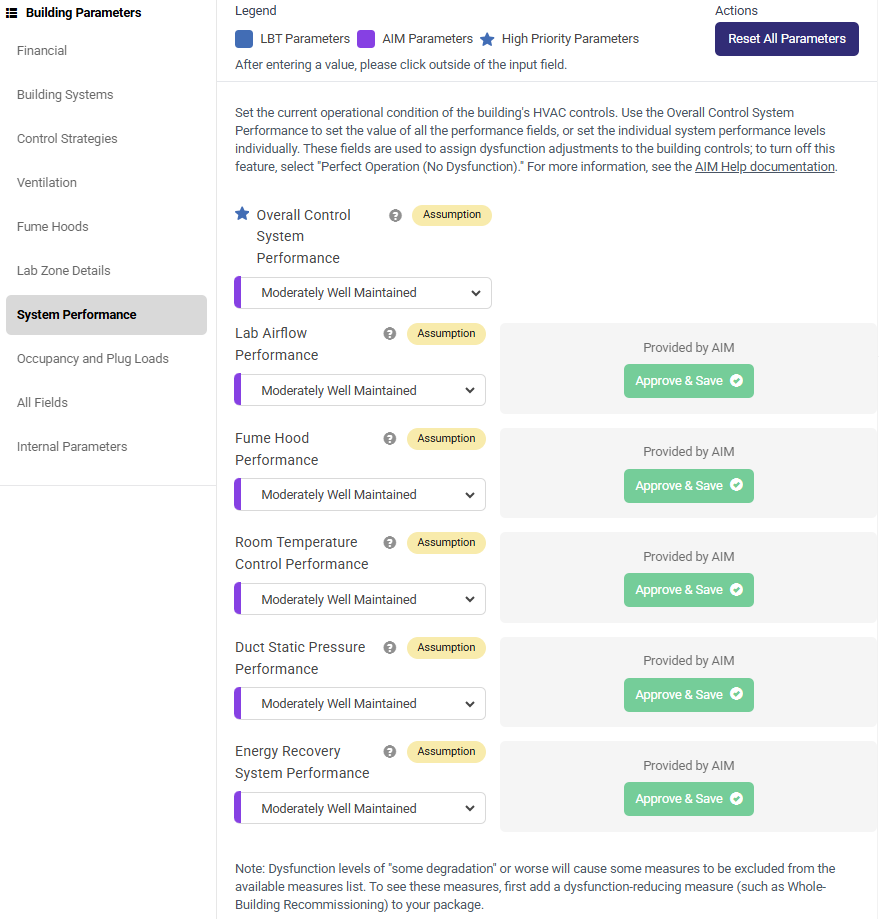
Use the System Performance tab within Building Parameters to set the current controls performance of your building. Each of the five parameter groups can be adjusted independently, or set together using the Overall Control System Performance parameter. The default assumption for all buildings is "Moderately Well Maintained." You should adjust these parameters as needed based on your knowledge of the building.
Measures Reducing Dysfunction
The following measures reduce dysfunction present in one or more parameter category, as well as any other parameter changes made by the measure. Please note that the individual measure descriptions within AIM contain further information on the parameter changes made by each measure's calculations.
- Monitoring-Based Commissioning Program for HVAC Systems
- Whole-Building Recommissioning of HVAC Controls
- Optimized Operation of Exhaust Air Energy Recovery Systems
- Upgraded Zone-Level HVAC Controls
- Recommissioning of Fume Hood Controls
- Variable Air Volume Controls for HVAC Systems
- Risk-Based Airflow Optimization
- Demand-Based Control of Lab Ventilation Using IEQ Sensors
- Variable Air Volume Controls for Fume Hoods
- Reduced Fume Hood Face Velocity
- Upgraded Fume Hood Performance
- VAV Controls for HVAC Systems, Including Manifolding FH Exhaust
- High-Performance Run-Around Exhaust Air Energy Recovery System
Note: marking a recommissioning measure as "Already in Building" will apply measure parameter changes to the building EXCEPT for the dysfunction reduction features. This is because the past application of a recommissioning effort does not mean that current performance is high. Please use the System Performance parameters within Building Parameters to set the current performance of the controls.
Measures Blocked by Dysfunction
The following measures are unavailable at dysfunction levels of "Some Dysfunction" or "Poor Operation." This is because poor controls performance typically prevents the effective implementation of complex controls measures. To see these measures, first add a dysfunction-reducing measure (such as Whole-Building Recommissioning) to your package.
- Unoccupied Room Airflow Setback
- Reduced Fume Hood Minimum Airflow
- Shut-the-Sash Program for Fume Hoods
- Supply Duct Static Pressure Setpoint Reset
- Exhaust Duct Static Pressure Setpoint Reset
- Unoccupied Room Temperature Setback
- Widened Lab Space Temperature Deadbands
- Fume Hood Automatic Sash Closers
- Fume Hood Unattended Face Velocity Reduction
How to Turn Off the Feature
All buildings contain some level of controls dysfunction, and we believe that this feature enhances AIM's offerings. However, if you would prefer to run the AIM calculations without the dysfunction and recommissioning features, simply select "Perfect Operation (No Dysfunction)" for the Overall Control System Performance field. For example, if the parameter values you have entered in AIM already include estimates of dysfunction (vs. design operation) then you should likely turn off AIM's built-in dysfunction features in order to avoid misleading savings estimates.
Was this information useful?